最近给朋友做个网站,要求分开两个注册页面,一个是普通用户注册的页面,一个是批发用户注册的页面,注册后自动加入到不同的客户群。
百度了N遍, 都没有找到相应的方法。最后谷歌了一下找到了个,经过测试magento 1.9版本的可用, 其它的版本没有试, 不过我想应该没有问题。
下面入正题《magento创建(添加)客户群注册页面,会员注册页面》的方法:
1,创建一个客户群’Wholesale’(其实默认就已经有了):
Customers > Customer Groups
点击 “Add New Customer Group”
Group Name 填你想要的名字比如 Wholesale
Tax Class:Retail Customner
其实默认就已经有了这个Wholesale的客户群
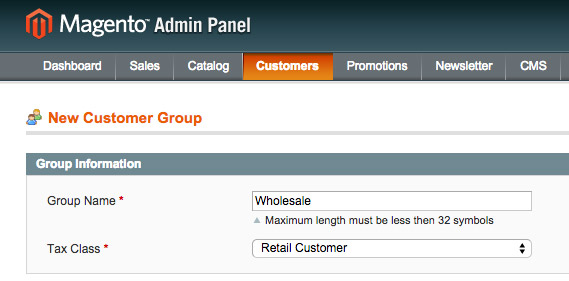
保存。
2,创建该客户群注册页面的表单(我这里就叫它wholesale表单好了):
新建一个register.phtml文件到这个目录下:/app/design/frontend/你的模板名/子模板名/template/wholesale/customer/form/register.phtml (如果没有子模板就是default)
内容如下:
<div class=”row”>
<div class=”col-md-10 col-md-offset-1″>
<div class=”panel-container shadowed text-left”>
<div class=”panel-body”>
<?php echo $this->getChildHtml(‘form_fields_before’)?>
<?php echo $this->getMessagesBlock()->getGroupedHtml() ?>
<form role=”form” action=”<?php echo $this->getPostActionUrl() ?>” method=”post” id=”form-validate”>
<input type=”hidden” name=”success_url” value=”<?php echo $this->getSuccessUrl() ?>” />
<input type=”hidden” name=”error_url” value=”<?php echo $this->getErrorUrl() ?>” />
<h4><?php echo $this->__(‘Personal Information’) ?></h4>
<div class=”row”>
<?php echo $this->getLayout()->createBlock(‘customer/widget_name’)->setObject($this->getFormData())->setForceUseCustomerAttributes(true)->toHtml() ?>
</div>
<hr>
<h4><?php echo $this->__(‘Company Information’) ?></h4>
<div class=”form-group”>
<label for=”company”><?php echo $this->__(‘Company Name’) ?></label>
<input type=”text” name=”company” id=”company” value=”<?php echo $this->escapeHtml($this->getFormData()->getCompany()) ?>” title=”<?php echo $this->__(‘Company’) ?>” class=”input-text <?php echo $this->helper(‘customer/address’)->getAttributeValidationClass(‘company’) ?>” />
</div>
<hr>
<h4>Contact Details</h4>
<div class=”row”>
<div class=”col-xs-6″>
<div class=”form-group”>
<label for=”email_address” class=”required”><?php echo $this->__(‘Email Address’) ?><span class=”reqstar”>*</span></label>
<input type=”text” name=”email” id=”email_address” value=”<?php echo $this->escapeHtml($this->getFormData()->getEmail()) ?>” title=”<?php echo $this->__(‘Email Address’) ?>” class=”input-text validate-email required-entry” />
<input type=”hidden” name=”group_id” id=”group_id” value=”2″ />
<?php $_dob = $this->getLayout()->createBlock(‘customer/widget_dob’) ?>
<?php if ($_dob->isEnabled()): ?>
<?php echo $_dob->setDate($this->getFormData()->getDob())->toHtml() ?>
<?php endif ?>
<?php $_taxvat = $this->getLayout()->createBlock(‘customer/widget_taxvat’) ?>
<?php if ($_taxvat->isEnabled()): ?>
<?php echo $_taxvat->setTaxvat($this->getFormData()->getTaxvat())->toHtml() ?>
<?php endif ?>
<?php $_gender = $this->getLayout()->createBlock(‘customer/widget_gender’) ?>
<?php if ($_gender->isEnabled()): ?>
<?php echo $_gender->setGender($this->getFormData()->getGender())->toHtml() ?>
<?php endif ?>
</div>
</div>
<div class=”col-xs-6″>
<div class=”form-group”>
<label for=”telephone” class=”required”><?php echo $this->__(‘Telephone’) ?><span class=”reqstar”>*</span></label>
<input type=”text” name=”telephone” id=”telephone” value=”<?php echo $this->escapeHtml($this->getFormData()->getTelephone()) ?>” title=”<?php echo $this->__(‘Telephone’) ?>” class=”input-text <?php echo $this->helper(‘customer/address’)->getAttributeValidationClass(‘telephone’) ?>” />
</div>
</div>
</div>
<?php if($this->getShowAddressFields()): ?>
<hr>
<input type=”hidden” name=”create_address” value=”1″ />
<h4><?php echo $this->__(‘Company Address’) ?></h4>
<div class=”form-group”>
<?php $_streetValidationClass = $this->helper(‘customer/address’)->getAttributeValidationClass(‘street’); ?>
<label for=”street_1″ class=”required”><?php echo $this->__(‘Street Address’) ?><span class=”reqstar”>*</span></label>
<input type=”text” name=”street[]” value=”<?php echo $this->escapeHtml($this->getFormData()->getStreet(1)) ?>” title=”<?php echo $this->__(‘Street Address’) ?>” id=”street_1″ class=”input-text <?php echo $_streetValidationClass ?>” />
</div>
<div class=”row”>
<div class=”col-xs-6″>
<div class=”form-group”>
<label for=”city” class=”required”><?php echo $this->__(‘City’) ?><span class=”reqstar”>*</span></label>
<input type=”text” name=”city” value=”<?php echo $this->escapeHtml($this->getFormData()->getCity()) ?>” title=”<?php echo $this->__(‘City’) ?>” class=”input-text <?php echo $this->helper(‘customer/address’)->getAttributeValidationClass(‘city’) ?>” id=”city” />
</div>
</div>
<div class=”col-xs-6″>
<div class=”form-group”>
<label for=”zip” class=”required”><?php echo $this->__(‘Postal Code’) ?><span class=”reqstar”>*</span></label>
<input type=”text” name=”postcode” value=”<?php echo $this->escapeHtml($this->getFormData()->getPostcode()) ?>” title=”<?php echo $this->__(‘Zip/Postal Code’) ?>” id=”zip” class=”input-text validate-zip-international <?php echo $this->helper(‘customer/address’)->getAttributeValidationClass(‘postcode’) ?>” />
</div>
</div>
</div>
<div class=”row”>
<div class=”col-xs-6″>
<div class=”form-group”>
<label for=”region_id” class=”required”><?php echo $this->__(‘State/Province’) ?><span class=”reqstar”>*</span></label>
<br>
<select id=”region_id” name=”region_id” title=”<?php echo $this->__(‘State/Province’) ?>” class=”validate-select” style=”display:none;”>
<option value=””><?php echo $this->__(‘Please select state or province’) ?></option>
</select>
<script type=”text/javascript”>
//<![CDATA[
$(‘region_id’).setAttribute(‘defaultValue’, “<?php echo $this->getFormData()->getRegionId() ?>”);
//]]>
</script>
<input type=”text” id=”region” name=”region” value=”<?php echo $this->escapeHtml($this->getRegion()) ?>” title=”<?php echo $this->__(‘State/Province’) ?>” class=”input-text <?php echo $this->helper(‘customer/address’)->getAttributeValidationClass(‘region’) ?>” style=”display:none;” />
</div>
</div>
<div class=”col-xs-6″>
<div class=”form-group”>
<label for=”country” class=”required”><?php echo $this->__(‘Country’) ?><span class=”reqstar”>*</span></label>
<br>
<?php echo $this->getCountryHtmlSelect() ?>
<input type=”hidden” name=”default_billing” value=”1″ />
<input type=”hidden” name=”default_shipping” value=”1″ />
<?php endif; ?>
</div>
</div>
</div>
<hr>
<h4><?php echo $this->__(‘Choose Password’) ?></h4>
<div class=”row”>
<div class=”col-xs-6″>
<div class=”form-group”>
<label for=”password” class=”required”><?php echo $this->__(‘Password’) ?><span class=”reqstar”>*</span></label>
<input type=”password” name=”password” id=”password” title=”<?php echo $this->__(‘Password’) ?>” class=”input-text required-entry validate-password” />
</div>
</div>
<div class=”col-xs-6″>
<div class=”form-group”>
<label for=”confirmation” class=”required”><?php echo $this->__(‘Confirm Password’) ?><span class=”reqstar”>*</span></label>
<input type=”password” name=”confirmation” title=”<?php echo $this->__(‘Confirm Password’) ?>” id=”confirmation” class=”input-text required-entry validate-cpassword” />
<?php echo $this->getChildHtml(‘form.additional.info’); ?>
<?php echo $this->getChildHtml(‘persistent.remember.me’); ?>
<?php echo $this->getChildHtml(‘persistent.remember.me.tooltip’); ?>
</div>
</div>
</div>
<hr>
<div class=”buttons-set”>
<p class=”back-link”><a href=”<?php echo $this->escapeUrl($this->getBackUrl()) ?>” class=”back-link”><small>« </small><?php echo $this->__(‘Back’) ?></a></p>
<button type=”submit” title=”<?php echo $this->__(‘Submit’) ?>” class=”btn btn-info btn-lg”><?php echo $this->__(‘Submit Registration’) ?> <i class=”fa fa-paper-plane-o”></i></button>
<?php if (Mage::helper(‘checkout’)->isContextCheckout()): ?>
<input name=”context” type=”hidden” value=”checkout” />
<?php endif; ?>
</div>
<script type=”text/javascript”>
//<![CDATA[
var dataForm = new VarienForm(‘form-validate’, true);
<?php if($this->getShowAddressFields()): ?>
new RegionUpdater(‘country’, ‘region’, ‘region_id’, <?php echo $this->helper(‘directory’)->getRegionJson() ?>, undefined, ‘zip’);
<?php endif; ?>
//]]>
</script>
</form>
</div>
</div>
</div>
</div>
</div>
</div>
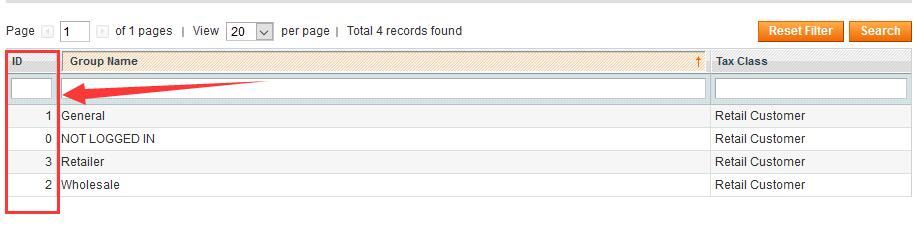
上面的代码找到<input type=”hidden” name=”group_id” id=”group_id” value=”2″ />把其中的2改面你创建的客户群的ID
客户群ID位置:
Customers > Customer Groups
3,判断客户注册途径
找到文件/app/code/core/Mage/Customer/controllers/AccountController.php
将
$customer->getGroupId();
修改为:
if($this->getRequest()->getPost(‘group_id’))
{ $customer->setGroupId($this->getRequest()->getPost(‘group_id’));
} else {
$customer->getGroupId(); }
4,创建自定义客户群注册页面:
CMS > Pages > Add New Page
在Design中加入代码:
<reference name=”content”>
<block type=”customer/form_register” name=”customer_form_register” template=”wholesale/customer/form/register.phtml”>
<action method=”setShowAddressFields”><value>true</value></action>
<block type=”page/html_wrapper” name=”customer.form.register.fields.before” as=”form_fields_before” translate=”label”>
<label>Form Fields Before</label>
</block>
</block>
</reference>
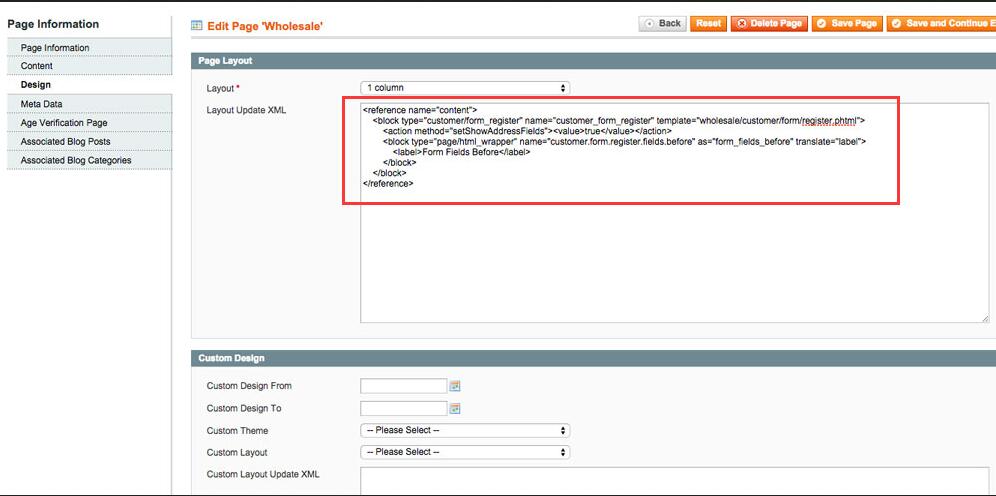
到这里magento创建(添加)客户群注册页面,会员注册页面就已经完工了。
另在网上还找到了一个编辑客户群属性的插件, 我自己没用过,有想试一下的可以点击这里下载。
欢迎转载,但请标明出处(毕竟手打一篇文章不容易呀!):http://blog.askadc.com/magento创建添加客户群注册页面,会员注册页面/